Bot detection
One of the biggest problems with web analytics is bot traffic. Bots, crawlers, and automated scripts make up a significant portion of web traffic, and if they’re counted alongside real visitors, your data becomes unreliable. Fathom automatically detects and blocks bot traffic so your dashboard only shows real human visitors.
How it works
When a request hits our servers, we classify it before it ever reaches your dashboard. Traffic that’s identified as non-human is separated out at the point of ingestion, so it’s never included in your pageviews, visitor counts, or event data.
We use multiple detection methods working together, including:
- Bot user agents: We maintain an extensive list of known bot and crawler user agent strings, covering search engine crawlers, monitoring tools, SEO bots, AI scrapers, and more.
- Datacenter IPs: Real visitors browse from residential or mobile networks, not cloud servers. We identify traffic originating from known datacenter and hosting provider IP ranges (like AWS, Azure, Google Cloud, DigitalOcean, and many others). To avoid false positives, we exclude VPN exit nodes and legitimate proxy services from this classification.
- Missing user agents: Real browsers always identify themselves with a user agent. Requests that arrive without one are flagged as non-human.
These layers work together, so a request only needs to trip one of them to be classified as a bot. We’re deliberately not publishing the full specifics of every technique because doing so would make it easier for bad actors to evade detection.
Seeing blocked bots on your dashboard
You can see how many bot requests were blocked directly on your dashboard. Look for the bot icon in the toolbar (next to the export and filter buttons), which shows the total number of blocked bot requests for your current date range. The icon is hidden while you have filters applied.
Click the bot icon to open a detailed breakdown showing:
- Classification: How the blocked traffic was categorised (datacenter IP, bot user agent, or empty user agent), with counts for each.
- Top countries: Which countries the bot traffic originated from.
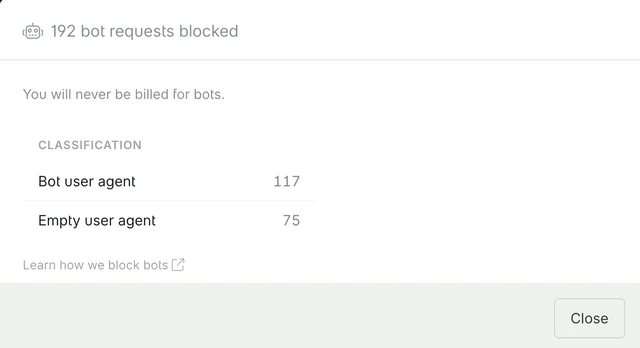
This gives you visibility into what’s being filtered out, so you can be confident your dashboard numbers represent real visitors.
Constantly evolving
Bot traffic changes all the time. New bots appear, existing ones change their behaviour, and bad actors look for ways around detection. We continuously update our detection methods, including refreshing our datacenter IP databases and expanding our bot signature lists. This happens behind the scenes, so you always have the latest protection without needing to do anything.
Spam that gets through
If some spam still reaches your dashboard, you can remove it from your past data and block it in your firewall settings.
Turning bot blocking off
Bot detection is on by default for every site. You can turn it off if a reverse proxy or custom tracking domain is marking real visitors as bots.
- Open Settings.
- Open the site.
- Set Bot blocking to Disabled.
New hits that we would have treated as bots will then count as visitors. Hits we already blocked stay in the bot count. Leave it on unless you have a reason to turn it off, because crawlers and datacenter traffic will then show in your dashboard.